iPod Touch Gestures
While I love the idea of the iPod Touch, I'm a little wary of how the touchscreen will work in the real world. With my current iPod (20GB 4G) I can easily skip a track or adjust the volume while walking, I don't need to look at the screen and in a pinch I can even control it from inside my pocket or bag. However, with just a big touch screen, it may not be as easy to control the music on the iPod Touch. Even the iPhone has dedicated volume buttons on the side and the included headphones have a play/pause and next track button on the microphone. 37Signals wrote a great entry on customizable gestures on the iPhone. I mentioned a similar idea here, and I still think some kind of gestures to control music would be awesome. Here are my ideas for some music control gestures for the iPod Touch that could work with the screen turned off or locked:
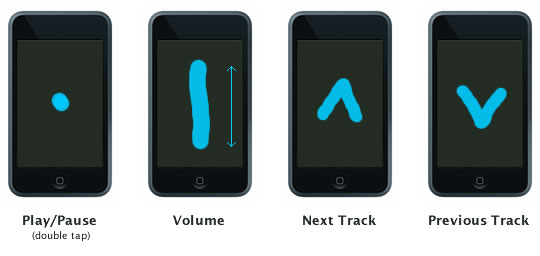
The iPod Touch has an accelerometer so it knows which way is up. So for the volume control, just drag a finger "up" to raise the volume, or drag your finger down to lower the volume, it would know which way is up no matter which way it was oriented. Using a double tap for play/pause might be a little tricky to distinguish between accidental taps, so that might not be realistic. The simplest solution is probably just to put three little buttons on the side one for play/pause toggle with double click for next track (just like on the iPhone headphones) and volume up and down buttons. But it kind of seems like a shame to not use that big touchscreen for everything, I mean why build a device with an awesome touchscreen just to stick some buttons on the side? Of course, the iPod Touch isn't even out yet, so this might turn out to be a total non-issue.
 (0)
(0)